VB AI Context
2026 · AI
- Role
- Creator
- Outcome
- Context architecture for multiple AI agents
Summary
VB AI Context is a local architecture for working with several AI agents. Context, rules, history and files live in folders on the computer, and any connected agent works from them.
- Problem: each AI kept its own context. Switching accounts or agents meant starting from scratch.
- What I did: I created the folder structure, the behavior rules in a single file and the permission levels.
Claude Code and OpenAI Codex read the same base, access the computer's files and connect to other apps through MCP. - Result: any agent picks up where the other stopped. My work got faster, from landing pages and SaaS to planning and data analysis.
A site that would take 12 days was ready in 3. - Stack: Markdown, Obsidian, VS Code, Claude Code, OpenAI Codex and MCP.
- Background: a personal project, published as a template on GitHub in September 2026.
Full case
5 min read
Context
I used Claude and ChatGPT in the browser. I put a few .txt documents in the memory and thought I now had an AI with context about me.
It was a first step, but it had a problem. I was at the mercy of a single AI.
When the credits ran out in the middle of a task, I waited for them to come back or paid for the more expensive plan.
The other way out was my secondary account. But it had to be taught from zero and did not continue from where I had stopped.
It felt like I was building a sandcastle.
I spent energy giving context to things that had already been given context once.
What came out of it turned into a Frankenstein, with no clear process and limited by the format of AI on the web.
With Claude Code inside VS Code, that changed. Everything that gets created becomes a local folder on the computer, with .md notes, and nothing is lost anymore.
I already used Obsidian a lot, with folders, notes and Zettelkasten, a method of small notes linked to each other. More recently, I also started using the source curation described by Andrej Karpathy.
A video by Ana Jords about the "second brain" made me join these two worlds.
The Obsidian folder opens in VS Code in the same format. From there, any connected AI works with the same context.
What I did
I created VB AI Context, an architecture in Markdown folders where several AI agents work with the same context. It needs no server, database or API key.
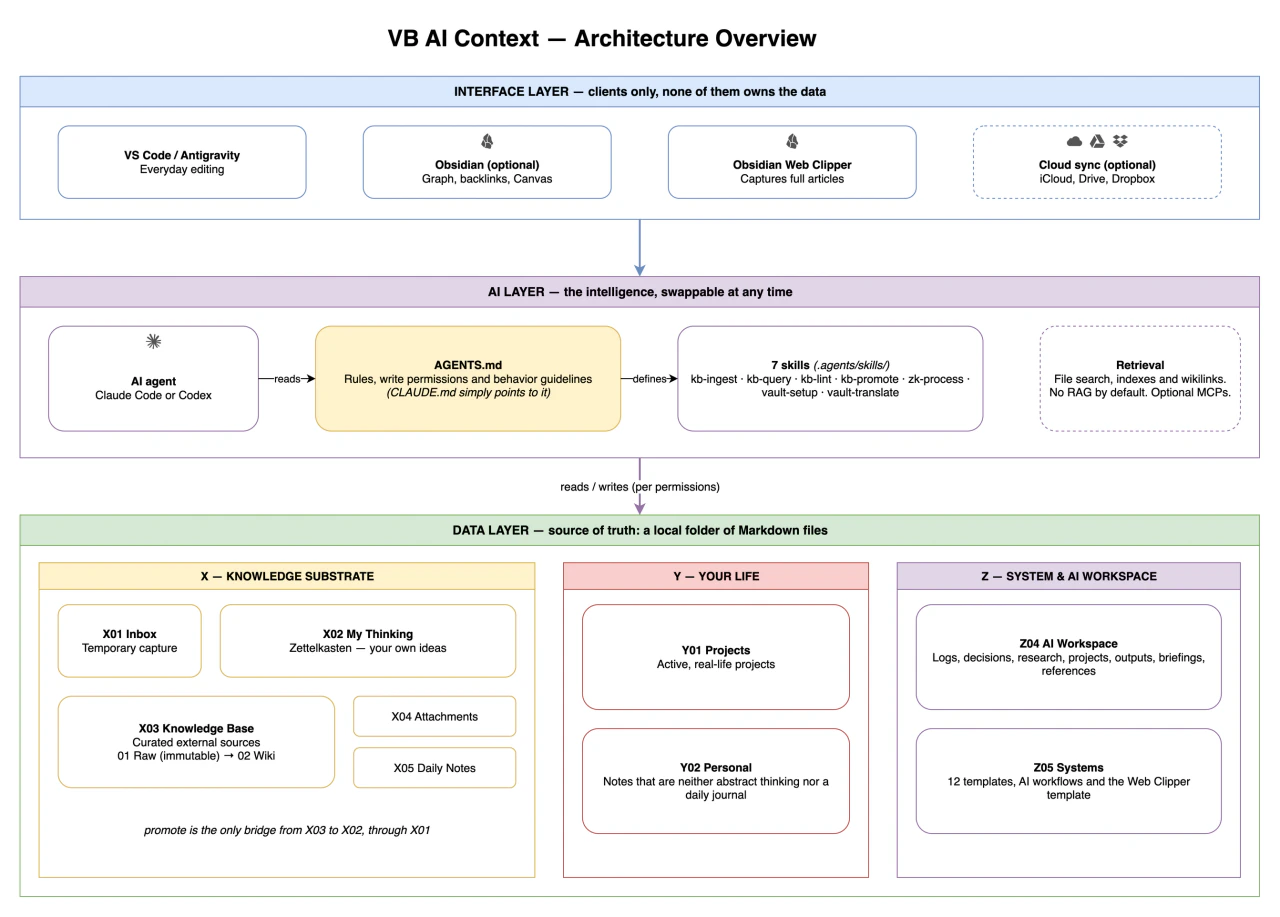
The folders are split into three layers: X for knowledge, Y for projects and personal life, Z for the system and the AI's workspace.
Knowledge follows two flows that do not mix:
- My Thinking, with the person's own thinking, in the Zettelkasten method;
- Knowledge Base, with chosen external sources, kept intact and summarized in a wiki maintained by the AI, in the curation described by Andrej Karpathy.
The only bridge between the two is promotion. A concept from the base goes to the inbox, and the person writes their own reading of it.
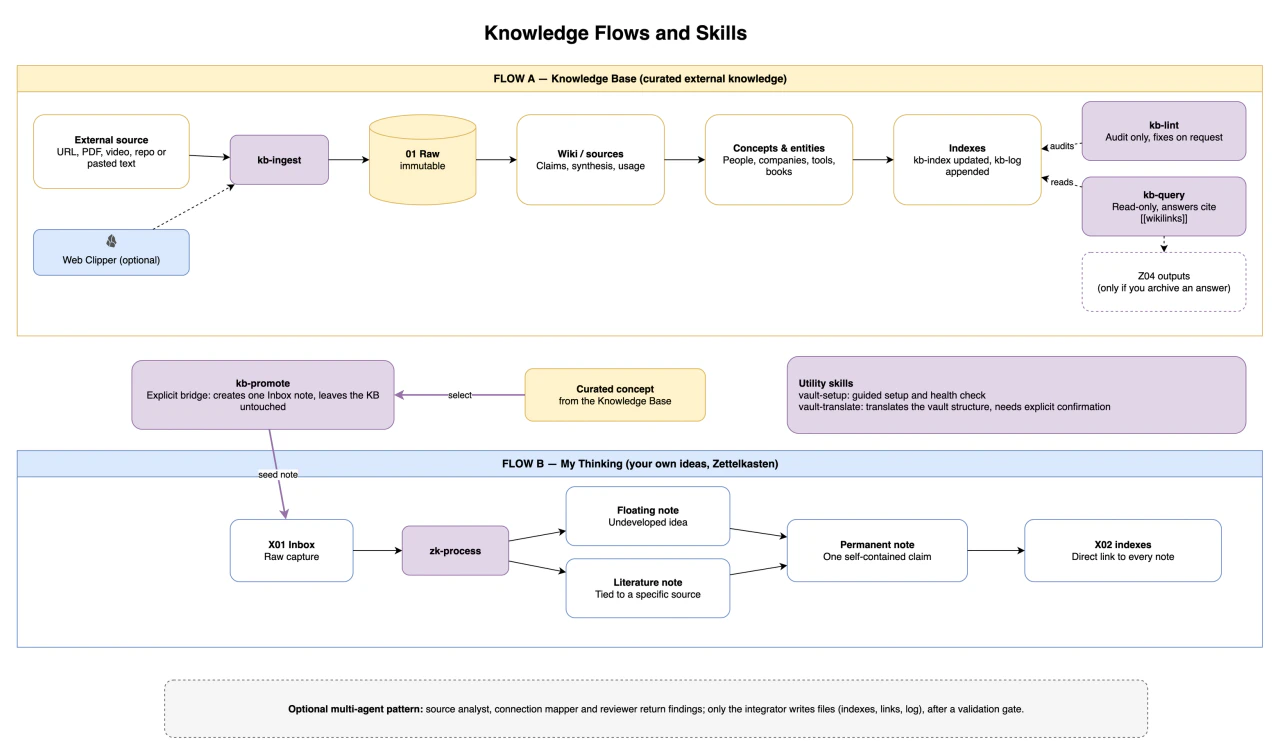
The agent reads the rules in a single file, AGENTS.md. That is why Claude Code and OpenAI Codex work in the same folder.
If one account runs out of credit, another continues the task from where it stopped.
I built seven skills, which are ready-made commands for the agent:
- vault-setup, which configures the folder and presents the structure;
- kb-ingest, which stores a source and creates the wiki notes;
- kb-query, which answers citing the notes it used;
- kb-lint, which points out broken links and duplicate notes;
- kb-promote, which takes a concept from the base to the inbox;
- zk-process, which turns captures into My Thinking notes;
- vault-translate, which translates the structure into another language.
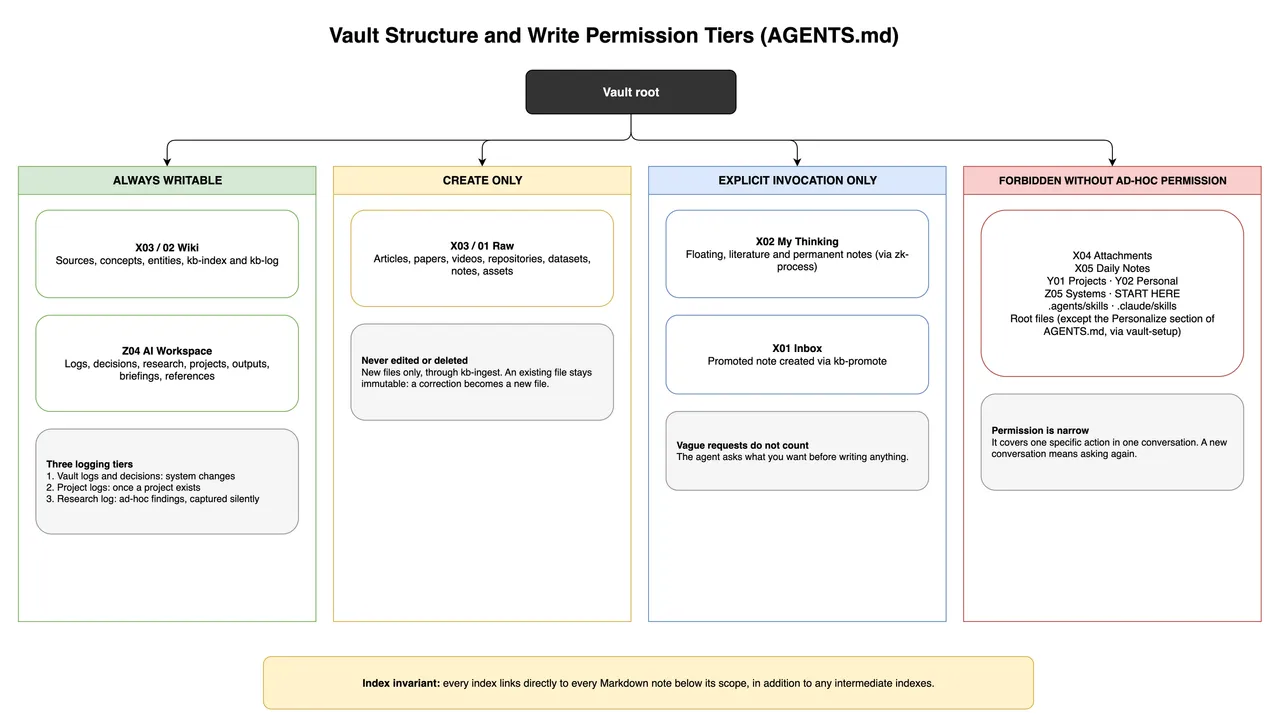
Write permissions
I defined four levels for where the AI can write:
- in the wiki and the AI Workspace, it writes without asking;
- in the raw sources, it only creates new files, without editing or deleting;
- in My Thinking and the inbox, only when the skill is called;
- everywhere else, only with permission given in that conversation.
My Thinking stays protected because it holds the person's thinking. An AI does not write that in their place.
How I use it
My base says who I am, what I do and what my projects are. It also holds what I believe, my values and my writing style.
I talk to the AI in the VS Code chat, inside the project. It goes to the apps that accept a connection through MCP or CLI, does the task there and brings it back done.
If the result is an image, it saves it in a folder of the project. If it is a site, I keep the source file.
Result
What changed was the time I spend on my work, from landing pages and SaaS to planning and data analysis.
A site that would normally take 12 days was ready in 3.
On 24 September 2026, I published on GitHub, as a template, the same structure I use. Personal and professional use is free, and selling it is not allowed.
The AI agent is still a separate service, which may require an account or a paid plan.
The project left me a base that does not depend on a single account and a history that continues from where it stopped.
Visit projectDevelopment
2026-09-24
First public version, with the two knowledge flows, six skills, the write permissions and the CC BY-NC-SA 4.0 license.
2026-09-25
Version 0.2.0, with the vault-translate skill and an explanation of the method behind the two flows.
2026-10-10
Architecture diagrams and opening image in the README.
Sources and further reading
Video · YouTube
Eu Hackeei o Meu Cérebro com Essa Ferramenta.Ana Jords
Video about the "second brain" that made me join Obsidian and my work with AI.
Article · zettelkasten.de
Overview of the Zettelkasten methodzettelkasten.de
The note method behind My Thinking.
Note · GitHub Gist
Andrej Karpathy's note on curating a personal wikiAndrej Karpathy
The source curation behind the Knowledge Base.